Overview
The Challenge
Development teams need secure access to production resources for deployments and operations, but traditional approaches using long-lived access keys create security risks and compliance headaches.
Why Not Static Keys?
- • Long-lived credentials increase attack surface
- • Difficult to rotate and manage at scale
- • Limited audit trail and attribution
- • Compliance and governance challenges
Cross-Account Roles Benefits
- • Short-lived credentials (15 minutes to 12 hours)
- • Fine-grained authorisation controls
- • Automatic credential rotation
- • Strong audit trail with CloudTrail
Security Controls Overview
System Architecture
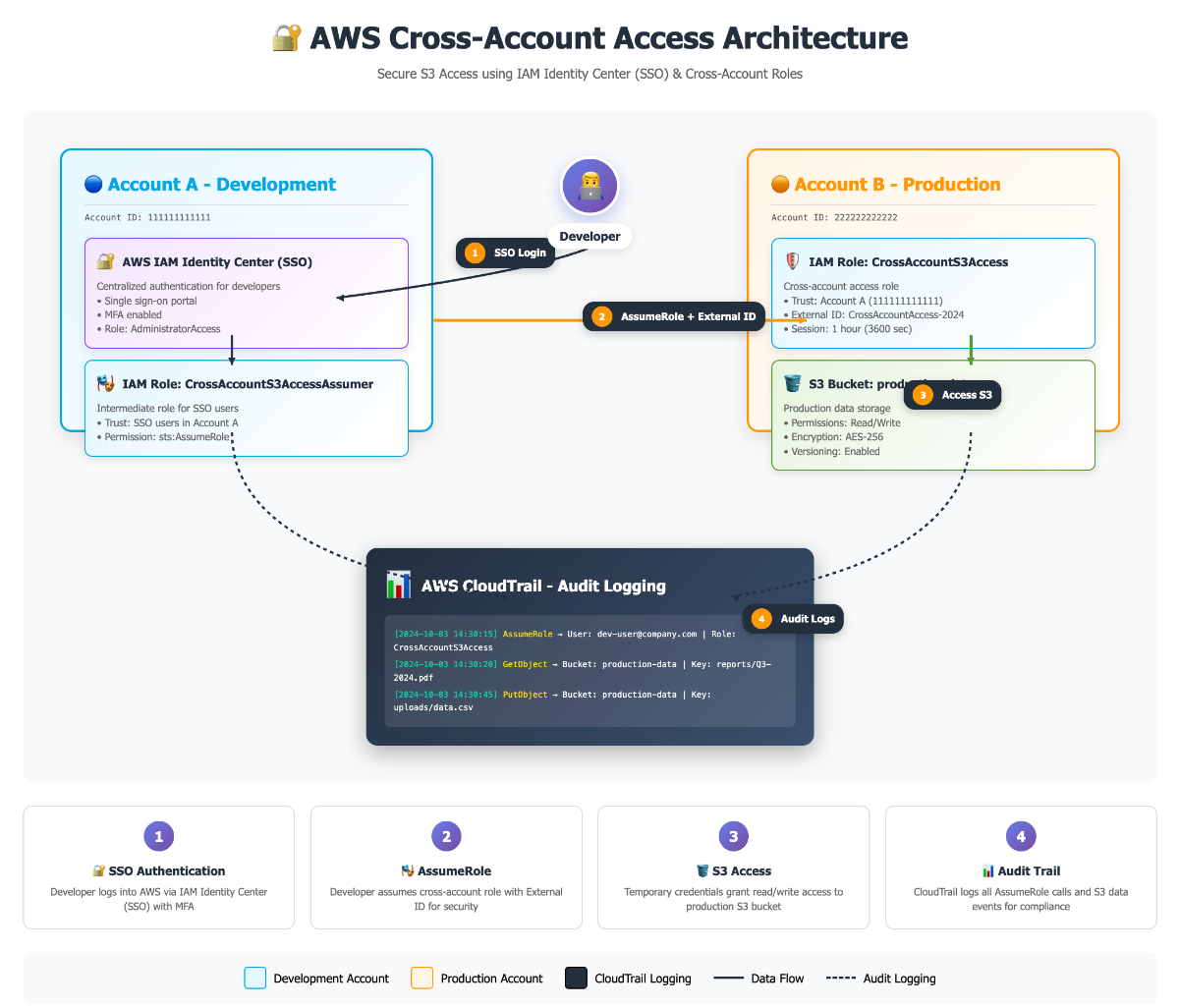
The solution uses AWS IAM Identity Center (SSO) for authentication, cross-account IAM roles for authorisation, and S3 bucket policies for fine-grained access control. Here's how the components work together:
System Context Diagram
Identity Layer
AWS IAM Identity Center provides centralised authentication with MFA enforcement. SSO profiles configured per account for seamless access.
Authorisation Layer
Cross-account IAM role in Production trusts Development account. STS issues temporary credentials with configurable session duration.
Data Access Layer
S3 bucket policy restricts access to the specific cross-account role. KMS encryption with role-based key policies for additional security.
Key Policy Configurations
The security model relies on two critical policies working together: the S3 bucket policy that restricts access to the cross-account role, and the IAM trust policy that allows the Development account to assume the role.
S3 Bucket Policy
Restricts bucket access to only the cross-account role, ensuring no other principals can access the data even if they have IAM permissions.
{
  "Version": "2012-10-17",
  "Statement": [{
    "Sid": "AllowCrossAccountRoleOnly",
    "Effect": "Allow",
    "Principal": {
      "AWS": "arn:aws:iam::<PROD_ID>:role/DevToProdS3Publisher"
    },
    "Action": [
      "s3:PutObject",
      "s3:ListBucket",
      "s3:GetObject"
    ],
    "Resource": [
      "arn:aws:s3:::<PROD_BUCKET>",
      "arn:aws:s3:::<PROD_BUCKET>/*"
    ]
  }]
}}
IAM Trust Policy
Allows the Development account to assume the Production role. Can be further restricted to specific users or roles within the Development account.
{
  "Version": "2012-10-17",
  "Statement": [{
    "Effect": "Allow",
    "Principal": {
      "AWS": "arn:aws:iam::<DEV_ID>:root"
    },
    "Action": "sts:AssumeRole",
    "Condition": {
      "StringEquals": {
        "aws:RequestedRegion": ["us-east-1", "ap-southeast-2"]
      },
      "Bool": {
        "aws:MultiFactorAuthPresent": "true"
      }
    }
  }]
}}
Security Best Practices
- • Add MFA requirement in trust policy conditions
- • Restrict to specific AWS regions using aws:RequestedRegion
- • Use aws:PrincipalOrgID to limit to your AWS Organisation
- • Set maximum session duration (1-12 hours)
- • Include external ID for additional security layer
Quick Start Runbook
Prerequisites:
- • AWS CLI v2 installed and configured
- • SSO profiles configured for both accounts
- • CloudFormation deployment permissions
- • Git repository cloned locally
Initial Deployment
Clone the repository and run the deployment script located at ./scripts/deploy_script.sh. This script will create the required CloudFormation stacks and test successful upload of files to the S3 bucket.
git clone https://github.com/akhilkakar/aws-cross-account-iam-automation
cd aws-cross-account-iam-automation
./scripts/deploy_script.sh
The script will prompt for SSO profiles and stack prefix. Deploy to Production account first, then Development account. The script automatically tests the cross-account access after deployment.
Cleanup
To remove the CloudFormation stacks when no longer needed:
./scripts/cleanup_script.shEnsure you use the same stack prefix that was used during deployment for proper cleanup.
Troubleshooting Guide
SSO Session Expired
Error: "The SSO session associated with this profile has expired"
Solution: Re-authenticate with your SSO provider:
aws sso login --profile <profile-name>